


Walk-ins and appointments in one token stream per department, the way an OPD actually runs
Reception Module
The Eruntar Reception Module is front-desk software for clinics and hospitals: patient registration with duplicate detection, multi-doctor appointment calendars, walk-ins and appointments in one OPD token queue, admissions coordination, visitor passes and desk payments.
A duplicate is caught before the record exists, a clash is caught before the patient arrives, and every action at the desk is audited.
3
ways to register: quick, complete, emergency
1
queue for walk-ins and appointments alike
30 min
of waiting before the desk is alerted
62
permissions, eight of them off by default
Reception Module
Solutions
Who it is for
The front desk of a clinic or hospital
Works with
Our Doctor, Nurse and Billing Modules, or on its own
Registration
Quick, complete or emergency
A duplicate
Caught before the record is created
The queue
Walk-ins and appointments, one token stream
Admissions
Five visible steps. The ward is told automatically
The money
Cash, card or UPI, with a receipt
Reminders
Appointments and recalls by email and SMS
Reports
Registration, queue, staff and branch, exported as CSV, Excel or PDF
The record
Append-only: who, what and when, on every write
Connects to
Builds HL7 v2 ADT and SIU, and FHIR R4
Availability
In any browser
Today's appointments, the walk-ins, the no-shows and the waitlist on one screen, with the alerts that need a hand first. Reminders and recalls have already gone out.
Quick for a moving queue, complete for full demographics, emergency for a patient with no name yet. Duplicates are caught before the record exists.
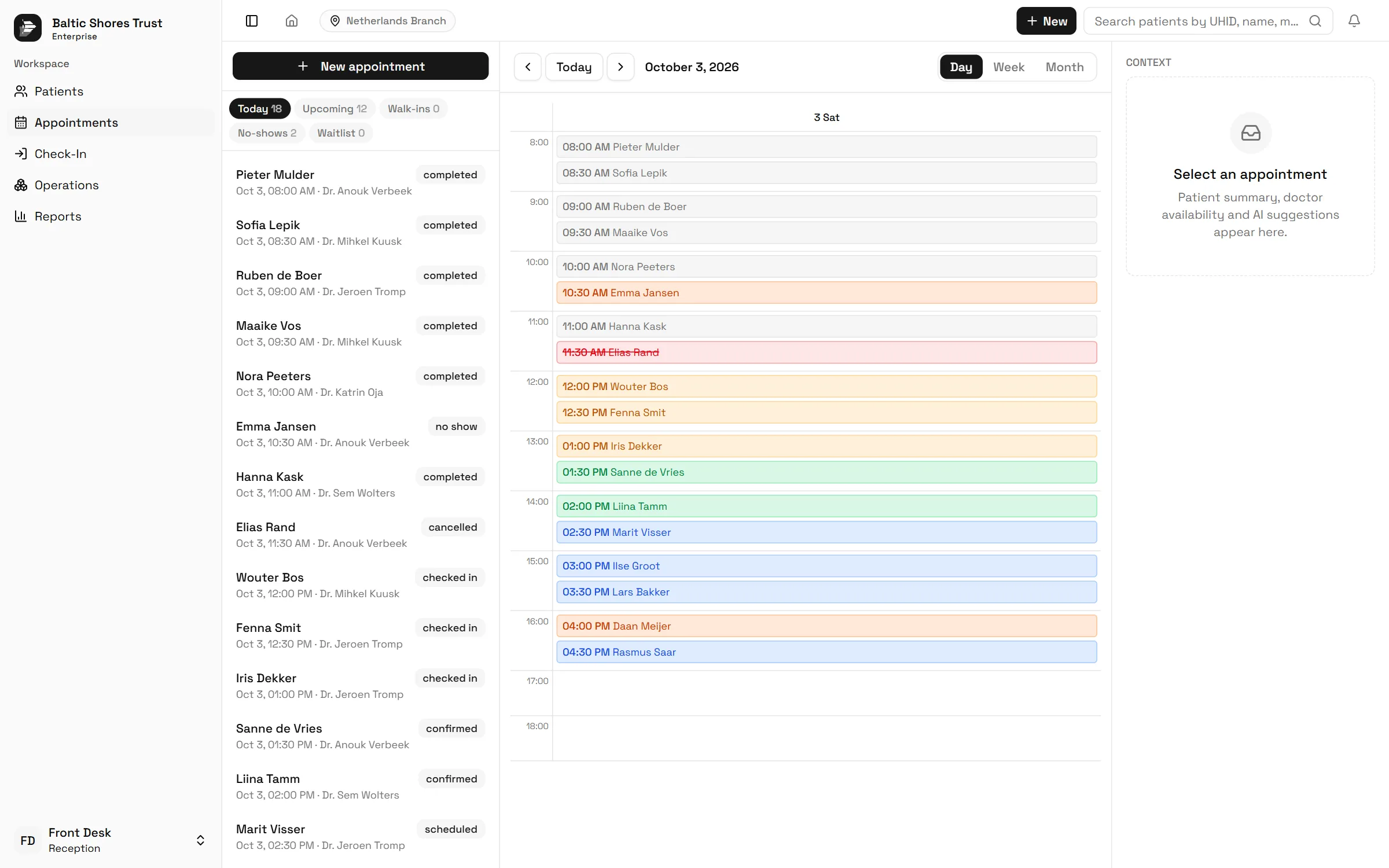
Every doctor on one calendar. Click an empty slot to book, drag a card to move it, and a double booking is refused.
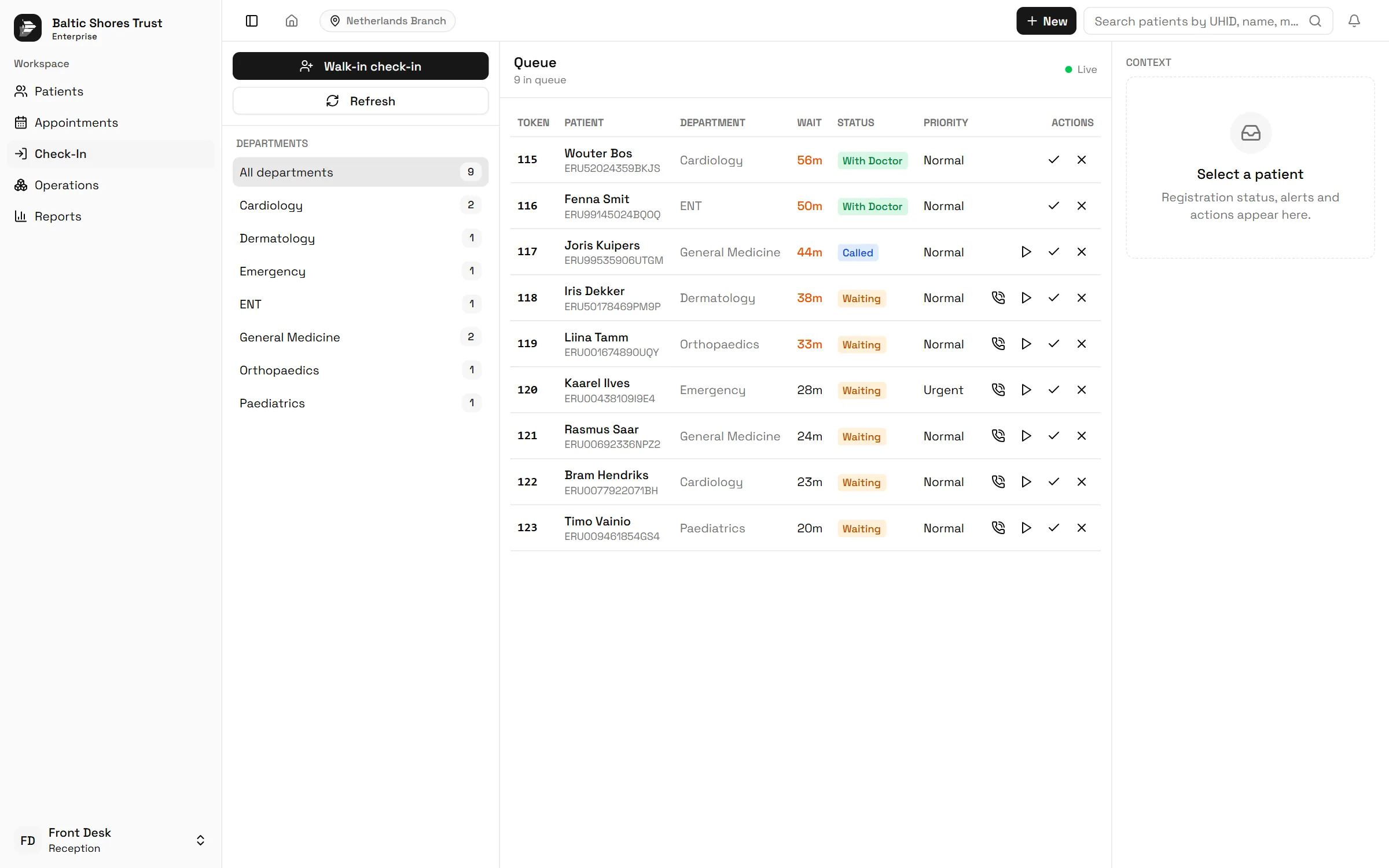
Check-in creates the encounter and issues the token. Call the next patient, recall one, or move a position, and the board keeps up.
An admission moves through five visible steps with the ward told automatically. At the end of the day, the totals and the reports are already there.
The module, screen by screen
Registration, admissions, printing, reports and the self-service kiosk, the way a front desk uses them through the day.
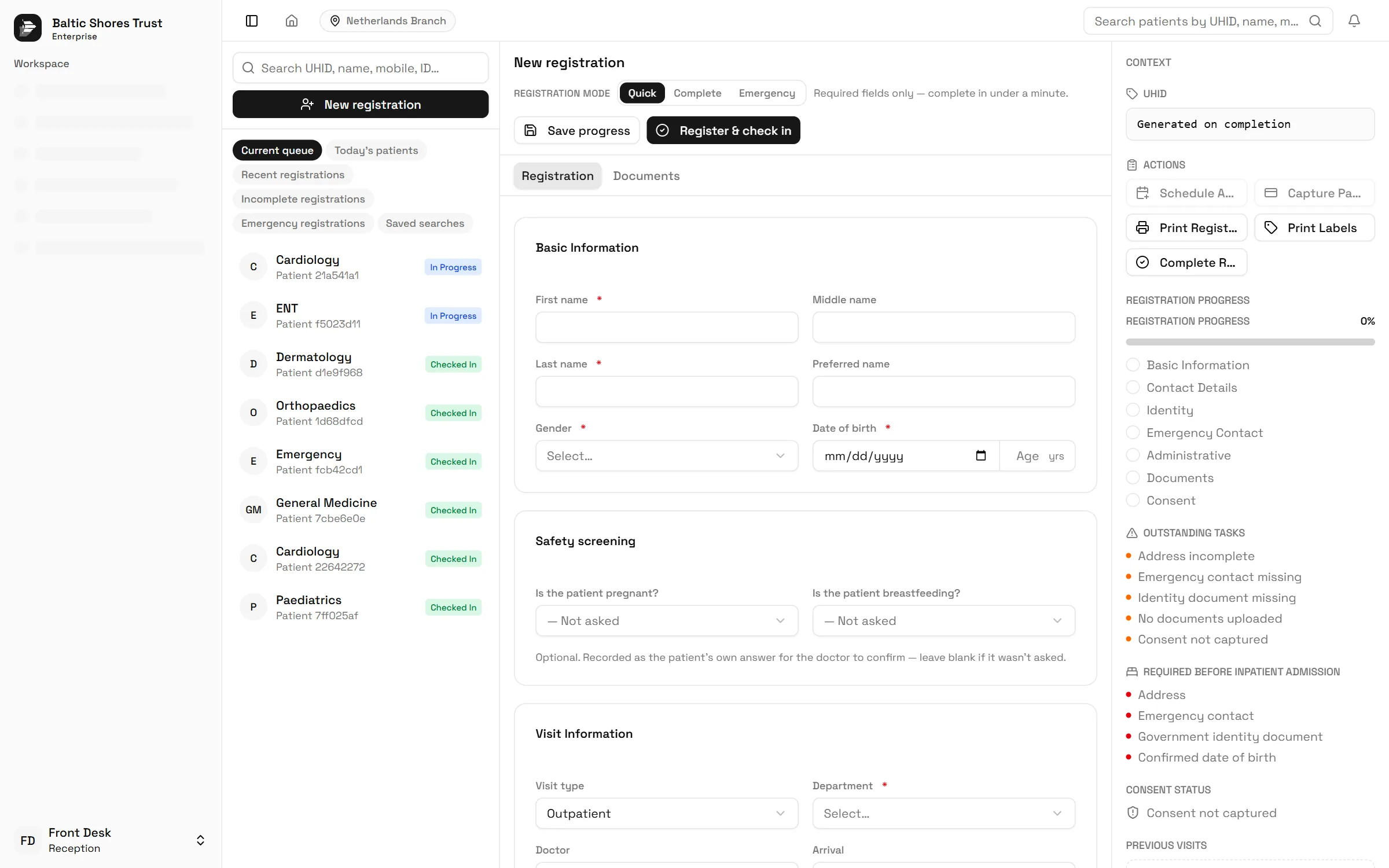
Registration has three modes. The form shows what is still outstanding as it is filled in, and what an inpatient admission will need later, so nothing is chased after the patient has gone.
The record
That sentence is from the module's own compliance documentation. These are the places where the desk will not let a busy morning turn into a bad record.
Name, date of birth, phone and identifiers are checked before the record is created. A likely duplicate is blocked unless it is deliberately forced, and the forced flag goes into the audit.
A merge is a request that someone else approves before it runs, never a silent overwrite. A merge already decided cannot be decided again.
Admissions move in order: requested, verifying, bed requested, nurse notified, admitted. A step cannot be skipped, and a finished admission cannot be edited.
When Billing is installed the desk refuses the payment and shows status only, so there is never a second source of financial truth.
A suggestion is not a write. Someone at the desk accepts it or does not, and if the AI platform is unavailable the desk keeps working manually.
This one is advisory. The desk can override a conflict when it is the right call, and the override is recorded with who made it.
The public queue page shows a code, a position and a time, never a name, a department or a reason. A bad link and an expired link look the same.
And once the patient is checked in
Checking a patient in creates the encounter and validates arrival, outstanding tasks and duplicates in one motion. Nobody re-keys anything.
The board refreshes itself with live wait times. Anyone waiting more than thirty minutes becomes an alert that links straight to the fix.
Every write lands in an append-only audit: who, what, and when. Nobody at the desk can edit or remove an entry.
Nothing changes patient data on its own. A suggestion is reviewed before it is accepted, every AI interaction is audited and metered, and if the AI platform is ever unavailable the desk simply keeps working manually.
Identity documents read into the registration form for review, with suggested completions and inconsistency checks as the record is built. Needs the AI platform connected.
Similarity scoring on top of the deterministic duplicate engine, and translation of patient-entered and administrative text at the desk. Needs the AI platform connected.
Congestion and wait-time forecasts with suggestions for balancing the departments, and workflow recommendations for the desk. Needs the AI platform connected.
Questions
It is front-desk software for clinics and hospitals: the administrative entry point of the building. It covers patient registration, appointment scheduling, walk-in and queue management, check-in, admissions coordination, visitor management, desk payments and printing, with every action audited.
Yes, and in the same queue. Walk-ins get a token alongside appointment arrivals in one stream per department, which is how an outpatient department actually runs. A walk-in can be converted into a proper appointment in one step without re-entering the patient.
Each department runs a live token queue. A token is waiting, called or arrived, and ends completed, missed or cancelled. Staff call the next patient, recall one, move positions and change priority from the board, and the patient's own view goes from issued to approaching to called. Priorities and estimated waits are part of the board, and a queue that has anyone waiting more than thirty minutes raises an alert.
Yes, before they exist. A deterministic engine checks name, date of birth, phone, national ID, passport, insurance and the health ID as a record is being created, and refuses a likely duplicate unless the receptionist deliberately forces it, in which case the forced flag is written to the audit. Merging two records is a request that someone else approves before it runs.
Yes. The calendar spans every doctor with day, week and month views and drag-and-drop rescheduling. A double booking is refused unless it is explicitly overridden, and the override is audited. Doctors and departments come from the organisation's own Eruntar setup, so the calendar follows your staffing without a second list to keep.
Yes. Patients check in for an appointment, confirm it or take a queue token on a kiosk with large touch targets and no administrative functions exposed. It ships in English, Finnish and Arabic with right-to-left support. It resets itself after a period of inactivity, so the next patient never sees the last one's screen.
Yes. Appointment reminders go out by email and SMS, and recalls bring a patient back when a follow-up is due. SMS can run on your organisation's own provider account or on the Eruntar platform account. Patients can also follow their place in the queue from their phone on a public page that shows a code, a position and a time, and never a name.
Yes. Inbound referrals from other clinics are recorded at the desk, and the source of a referral is captured when a patient is registered, so you can see where your patients come from.
Yes: consultation, registration and deposit fees in cash, card or UPI, with receipts, refunds and a running daily total. When the Eruntar Billing Module is installed, the desk hands off to it and shows payment status only, so there is never a second source of financial truth.
Through five visible steps: requested, verifying, bed requested, nurse notified, admitted. A bed cannot be requested until the registration is complete, the ward is told automatically, and the clinical decision to admit stays with the doctor. Reception coordinates, it does not decide.
The module builds HL7 v2 ADT messages for registration, check-in, admission and transfer, SIU messages for appointments, and FHIR R4 Patient, Appointment and Encounter resources for the systems around it. How they are delivered to a hospital system is set up with you for each site.
Yes. A checked-in patient is handed to the Doctor Module with the assigned doctor notified, admissions notify the Nurse Module, and the money and coverage hand off to the Billing Module, so the record that starts at the desk is the same one the ward, the laboratory and the ICU work from.
When the module is connected to the Eruntar AI platform, it can read identity documents into the registration form, suggest completions and flag inconsistencies, score possible duplicates, translate text at the desk, recommend next steps and forecast queue congestion. None of it changes patient data on its own: a suggestion has to be reviewed by a person before it is accepted, every AI interaction is audited, and if the AI platform is unavailable the desk keeps working manually.
Access is by capability rather than by job title: 62 of them, in seven ready-made roles from receptionist to read-only auditor. Eight sensitive actions, among them merging records, refunding money, overriding a queue position and forcing a check-in, are denied by default even for the right role until the facility switches them on.
As a single Enterprise plan, quoted for your organisation by the number of desks, doctors and branches you run. Nothing is held back for a higher tier because there is no higher tier: registration, calendars, the priority queue, the kiosk, admissions, visitors, payments, reports and the AI assistance are all included. Onboarding support comes with it. Book a demo through the form on this page.
What is included
The Reception Module is sold as a single Enterprise plan, quoted for your organisation. There is no ladder to climb, so every capability on this page is included, the kiosk and the AI assistance among them. Pricing is quoted for the number of desks, doctors and branches you run.
Desks, doctors & branches per agreement
Quoted for the number of desks, doctors and branches you run.
Talk to usNeed help sizing it, or running several branches? Talk to our team.
A working session rather than a slide deck: your desk, your doctors, your queue. Tell us how many desks and doctors you run and we will take it from there.
Rather see the consulting room first? Explore the Doctor Module.